These channel changes have been co-ordinated by The Digital Network, an industry body that includes the operators of all the digital terrestrial multiplexes. The reason these changes have been introduced are:
 
1 to include three figure channel numbers in order to accommodate the growing number of television channels being added to the DTT platform now and in the future.
2
to allow the opportunity to group together channels targeted at similar audiences.
 
The new Top Up TV channel numbers are:
 
Formerly Channel NEW
17 UKTV Gold   17 
25 TCM 25
26 UKTV Style 26
27 Discovery Channel 27
28 Discovery Real Time   28 
29 UKTV Food 29
32 Cartoon Network 72
33 Boomerang 73
44 Bloomberg 84
49 Eurosport 33
58 Toonami 74
 
Other channel number changes are:
 
Formerly Channel NEW
57 Setanta Sports (Scottish and Grampian regions only) 34 
60 Television X 97
61 Red Hot 98
 
If your Set Top Box or Digital TV does not automatically re-scan, you'll have to do a re-scan yourself - see your manufacturer's guide for details. Please see below a generic guide to re-scanning your equipment (note that not all equipment is the same - there may be slight differences between individual models.) If you're still having problems please call us on 08 712 712 712.
 

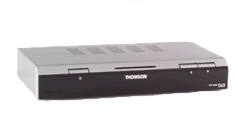
Thomson DTI 2300/DTI 2305

1. Press Menu on your remote control.
2. Scroll Down Installation, then press OK.
3. Choose the First option Terminal then press OK.
4. Select Channel then press OK.

Your set top box will automatically retune your box so that you can receive all the available channels.

and finally press Exit to return to normal TV viewing.


Echostar 105T

1. Press the Menu button on the remote control.
2. Scroll to Installation option, then press select.
3. Scroll to channels option, then press select.
4. Press the red button to start an automatic channel store.
5. Press Exit to return to the main menu once completed.


Digifusion FRT 101T, Matsui TUTV 1, Ferguson DTT2500 and Astratec TOP D2.

1. Press the Setup button on the remote control.
2. Scroll to Channel SetUp, then press OK.
3. Scroll to channel tuning, then press OK.
4. Choose Full Scan.
5. Choose Add new channels.
6.Press Exit to retune to the main menu once completed if required


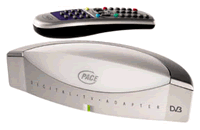
Pace DTVA

1. Press the Menu button on the remote control.
2. Scroll down to Channel list and press and press the right arrow key to access.
3. Select the Scan for channels option.
4. Choose Automatic channel store, this can take upto 5 minutes to complete.


Netgem iPlayer

1. Press the Menu Button on your remote control
2. Choose the MY Player option.
3. Choose Preferences option.
4. Choose the Television option.
5. Choose the Tuning option.
6. Choose Automatic channel store, this can take upto 5 minutes to complete.


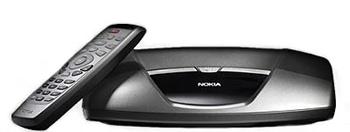
Nokia 221T

1. Press the Navi button on your remote control.
2. Scroll along to Settings.
3. Select the Channels option.
4. Choose Automatic channel store, this can take upto 5 minutes to complete.

 
Terms and Conditions | Privacy Policy